For years, measuring a campaign meant pasting each platform’s pixel onto the website. It worked, but more and more data is being lost to cookie rejection, browser restrictions and blockers, and the website fills up with third-party code you don’t control.
Server-side tracking, also called server-side tagging, changes the path that data takes. In this article we explain how it works, what it improves, what it doesn’t solve and when it is worth it.
In short
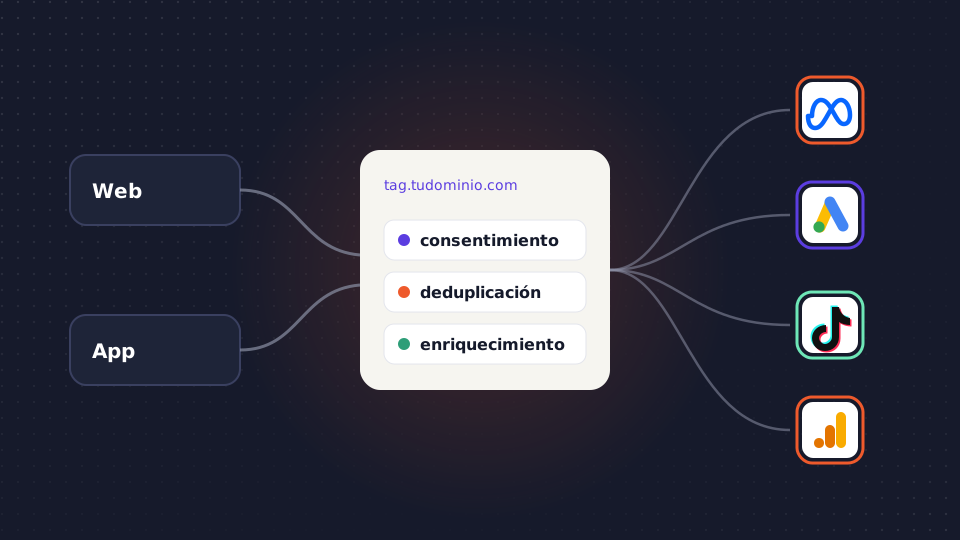
- Events from your website or app go first to a server on a subdomain of yours, such as tag.yourdomain.com, and from there to each platform via API.
- You gain control over what data you share, longer-lasting first-party cookies and fewer third-party scripts on the page.
- It doesn’t replace consent, nor is it some magic cookieless measurement: the user still decides.
- If you combine browser and server events, you have to deduplicate them with an event_id.
- It has hosting costs and needs a technical owner. Not every advertiser needs it.
What server-side tracking is
In client-side tagging, the user’s browser loads each platform’s tag and sends events directly to Google, Meta or TikTok. Each vendor receives whatever its script collects.
In server-side tagging, the website sends events to a single destination: a tagging server that lives on a subdomain of yours. That server receives the event, processes it and forwards it to each platform through their APIs.
What changes compared with browser tagging
Requests go to your own domain
The browser no longer talks to dozens of third-party domains, but to a subdomain of yours. To the browser, it is first-party traffic.
The server decides what reaches each platform
You can strip the IP address or URL parameters before forwarding, send each platform only the events that concern it and discard traffic you don’t want to count, such as bots or internal tests. This is the most important change: you decide what gets shared.
First-party cookies that last longer
Safari, with its Intelligent Tracking Prevention (ITP), limits cookies set by JavaScript to seven days, and doesn’t accept third-party cookies at all. Cookies your server sets in an HTTP response from your domain can last longer, so a user who comes back two weeks later is still recognizable. One caveat: Safari also limits server cookies when the tagging subdomain points to infrastructure very different from your website’s, so how it is configured matters.
Less third-party code on the page
If several platforms are fed from the server, you can remove some of their scripts from the website. Less third-party JavaScript usually means a faster-loading page.
What server-side tracking doesn’t do
- It doesn’t get around consent. If the user rejects advertising or analytics cookies, that data can’t be sent, whether it goes through the browser or the server. The server has to read your CMP’s signal and respect it.
- It isn’t cookieless measurement by magic. It still uses cookies, just first-party ones. What improves is their lifespan and your control, not the need for permission.
- It doesn’t dodge every blocker. Your own subdomain holds up better than the platforms’ well-known domains, but some blockers also detect the usual tagging scripts or paths.
What pieces you need
- A tagging server. The most widespread option is server-side Google Tag Manager, which can be deployed on Google Cloud Run or with a managed provider that hosts it for you.
- Your own subdomain. For example, tag.yourdomain.com, pointing to that server.
- A web container. Your usual GTM or the Google tag on the page, configured to send events to your server instead of to each platform.
- A server container. It receives requests through “clients” that interpret them and fires each destination’s tags.
- Each platform’s tags. The Meta Conversions API, Google Ads enhanced conversions, the TikTok Events API and the GA4 Measurement Protocol, among others.
We explain the Meta piece in the Conversions API guide.
Deduplication: when the browser and the server send the same event
Many setups keep the pixel in the browser and add sending from the server. That is reasonable, but the same purchase arrives twice. For the platform to count it only once, both sends have to carry the same identifier: in Meta and TikTok, the same event name and the same event_id; in Google Ads, the same transaction ID. Without that, conversions get inflated and bidding learns from duplicate data.
Enriching events with your business data
The browser only knows what happens on the website. Your server can query other systems before forwarding the event: the order margin from the ERP, the lead quality from the CRM or whether the customer had bought before. What happens days later, such as a sale closed over the phone or a return, is completed with offline conversions from your source of truth.
Costs and maintenance
A tagging server is infrastructure and costs money every month. On Cloud Run, Google recommends several instances for production, and the cost grows with traffic. A managed provider simplifies deployment in exchange for a fee.
The less visible cost is maintenance. Someone has to make sure the server is responding, update the templates and check that consent and deduplication still work after every change to the website. Without a technical owner, a server-side setup degrades silently.
When you need it and when you don’t
It pays off if several of these conditions apply:
- You invest in several platforms and their automated bidding depends on the conversions they receive.
- A significant share of your traffic comes from Safari or iOS.
- You want to control what personal data each vendor receives.
- You want to send business values, such as margin or lead quality, and not just the event.
- You have someone, in-house or external, to look after it.
You probably don’t need it yet if you spend little on media, use a single platform with its native integration or your conversions already arrive from the CRM as offline conversions.
Common mistakes
- Setting it up to bypass consent. It is a legal risk and, besides, that isn’t what it is for.
- Duplicating events. Sending from the browser and from the server without a shared
event_id. - Using a domain that isn’t yours. Without your own subdomain, you lose much of the first-party cookie advantage.
- Having no owner. Nobody checks the server until conversions drop.
How Babuin does it
At MonkeyFlux, the events from your website and your app go through a server on your own domain, such as tag.yourdomain.com, with first-party cookies. There, consent is applied, events are deduplicated by event_id and enriched with data from your CRM and your ERP, such as margin, LTV, lead quality or returns. They are then sent to each platform through Conversions API, Enhanced Conversions, Events API or Measurement Protocol. It is compatible with your server-side GTM container.
With those signals, Babuin measures each medium against your business results, MonkeyBot bids towards real value and DBA allocates the budget across channels every day.
Frequently asked questions
Does server-side tracking avoid having to ask for cookie consent?
No. Consent applies in the same way whether the data leaves the browser or your server. The right approach is for the server to read your CMP’s signal and only send each platform the data of users who have accepted that use.
What is the difference between web GTM and server-side GTM?
Web GTM runs in the user’s browser and sends data directly to each platform. Server-side GTM runs on a server of yours: it receives events from the web container and decides what to forward to each destination, with what data and when.
How much does server-side Google Tag Manager cost?
GTM is free, but the server it runs on isn’t. The cost depends on traffic, the number of instances and whether you host it on Google Cloud Run or with a managed provider. On top of that, add the time of whoever maintains it.
Does server-side tracking replace the Meta pixel?
Not necessarily. Many setups combine the pixel with the Conversions API and deduplicate events with the same event_id. That way Meta receives the event even if one of the two sends fails, and counts it only once.