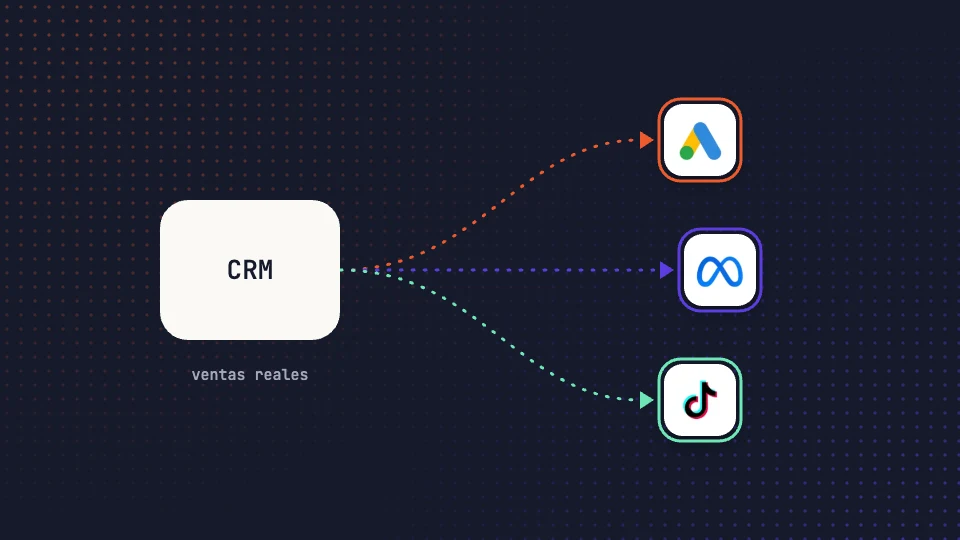
Almost every lead generation advertiser has the same problem: the campaigns optimize towards the form, because it is the only thing the platform can see. What happens next, whether the lead answered the phone, whether it was qualified or whether it ended up buying, stays in the CRM and never gets back to the platform.
An offline conversion is exactly that data going back: a result that happens outside the website or the app (a sale closed over the phone, a qualified lead, a delivered order) that is sent to the platform linked to the click or the user that originated it. In this article we explain what you need, how to upload them to Google Ads and Meta, and what changes when you do.
In short
- You need three things: an identifier to link the sale to the click or the user, the date and value of each result, and the user’s consent.
- Google Ads accepts conversions by click ID (GCLID) or by hashed contact data (enhanced conversions for leads).
- Meta receives them through the Conversions API, matching hashed contact data with its users.
- Once they receive them, automated bidding stops chasing forms and looks for the user profile that ends up buying.
- The usual mistakes are uploading without value, uploading weeks late and counting the same sale twice.
What data you need before you start
Whatever the platform, without these three elements the upload is useless.
1. A matching identifier
The platform has to be able to link your sale to one of its clicks or users. There are two ways. The first is the click ID: Google Ads adds a GCLID parameter to the URL of every click, and your form or your CRM has to store it alongside the lead. The second is the customer’s contact data (email, phone, name and address), which is hashed with SHA-256 before being sent and which the platform matches against its own users. Meta works with this second way; Google supports both.
2. Date, name and value of the result
Each conversion carries the name of the action (qualified lead, sale, delivered order), the date and time it happened and, if you want to optimize by value, the amount and the currency. Without value, the platform can only look for more conversions; with value, it can look for the ones that contribute the most.
3. Consent
You can only send data from users who have consented to that use. In practice this means your CMP records the consent and the upload respects that signal, including for hashed data.
How to upload them to Google Ads
Google Ads has two mechanisms, and it is worth choosing based on what your CRM is able to store.
Import by click ID
This is the classic way. Your website captures the GCLID from the URL, stores it in a hidden form field and the CRM keeps it on the lead’s record. When the lead becomes a sale, you upload a row to Google Ads with the GCLID, the conversion name, the date and the value. Google attributes it to the original click and to its campaign, ad group and keyword.
What the GCLID is
The GCLID (Google Click Identifier) is a unique code that Google Ads adds to the landing page URL on every click, such as ?gclid=…, when auto-tagging is enabled. It identifies that specific click: the campaign, the ad group, the keyword and the moment. If your website stores it in a hidden form field and the CRM keeps it with the lead, you can send Google back the exact sale that click generated. Meta has an equivalent, the fbclid, although its Conversions API relies mainly on hashed contact data.
Enhanced conversions for leads
If your CRM doesn’t store the GCLID, Google lets you upload the conversion with the hashed contact data the user left in the form. Google matches it against the users who clicked on your ads and attributes the sale. It is less exact than the GCLID, but it requires no changes to the website or the CRM.
Where to upload
Manually with a template in the conversions section, on a schedule from a spreadsheet or from direct integrations with CRMs such as Salesforce or HubSpot, or through the Google Ads API if you want to automate it. The conversion must be uploaded within the conversion window you have configured, so the sooner it arrives, the better.
How to upload them to Meta
Meta receives offline results through the Conversions API, the same one used for server-side website events. You create a dataset in Events Manager and send the events with the hashed contact data, the date and the value. Meta matches them against its users and attributes them to the ads they saw or clicked within the dataset’s attribution window.
The routes are similar to Google’s: manual file upload, integrations with CRMs and customer data platforms, or the API directly. The more complete the contact data (email and phone, at least), the higher the match rate and the more conversions Meta manages to attribute.
What changes in bidding when the platforms receive your sales
Google Ads automated bidding and Meta’s Advantage+ campaigns learn from the conversions they receive. If what they receive is forms, they look for users who fill in forms, even if they never pick up the phone afterwards. If they receive sales, they look for the user profile that ends up buying.
The effect usually shows in two steps. First, lead volume drops and cost per lead rises, because the platform stops buying the cheap ones that weren’t converting. Then the cost per sale drops, which is what matters. For the learning to work you need volume: a few dozen conversions per month per campaign at minimum; with fewer, the signal is too weak.
There is a second, less visible effect: with sales uploaded, you can compare Google’s and Meta’s cost per sale with the same yardstick, because both are measured against your CRM. It is the basis for allocating the budget across media with data rather than with the conversions each one claims for itself.
Five common mistakes
- Uploading without value. Every sale weighs the same and the platform optimizes by volume, not by business.
- Uploading late. If the upload is monthly, the platform learns a month late and some conversions fall outside the window.
- Not storing the identifier. If the form doesn’t keep the GCLID or the CRM deletes it when merging contacts, there is no possible match.
- Counting twice. If the website already sends the form as a conversion and you also upload the sale, define clearly which one is the primary conversion for bidding. Usually the sale is primary and the form, secondary.
- Forgetting consent. Sending data from users who refused it is a legal risk and, besides, the platform discards it.
How Babuin does it
Babuin automates the full cycle. It connects to your CRM, reads the qualified leads and sales with their value and date, and sends them to Google Ads and Meta as offline conversions linked to the click or the user that originated them. With that same data, MonkeyBot bids for real sales and DBA allocates the budget across media every day based on each one’s cost per sale, measured in your CRM.
The platforms will keep optimizing towards what they receive. The difference is that, from then on, they receive what actually sells.