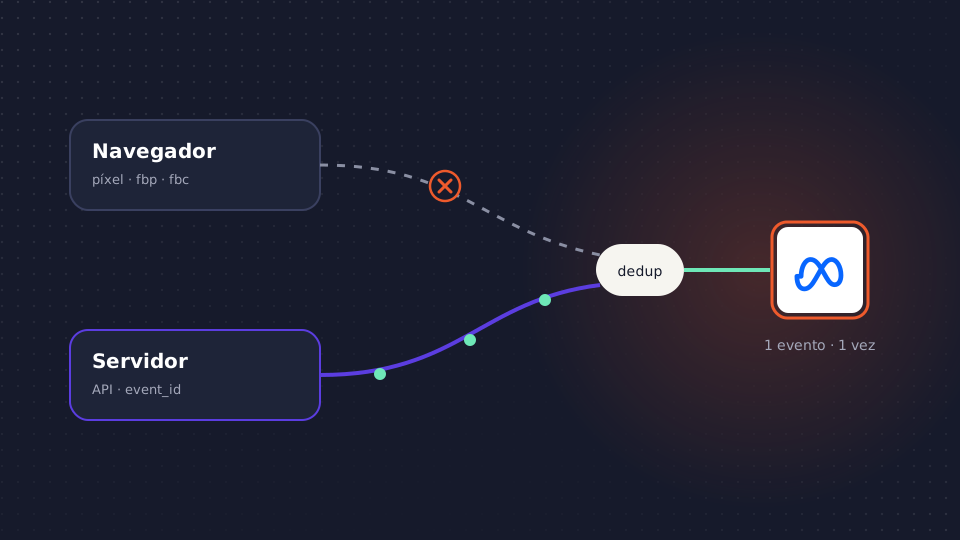
It is a common complaint: the store records a hundred orders in a week and Meta’s Events Manager shows quite a few fewer. The pixel is installed and, even so, conversions are missing. The campaigns optimize with that incomplete data.
The Meta Conversions API (CAPI) exists to close that gap. We explain what it is, how to set it up without counting each sale twice and what to check when purchases don’t show up.
In short
- The pixel sends events from the browser; the Conversions API sends them from a server. Meta recommends using both at the same time.
- The pixel loses events to blockers, browser cookie limits, refused consent or pages that close too early.
- If you send the same event through both routes, you have to deduplicate it with the same
event_nameand the sameevent_id. - The more customer data you send, hashed with SHA-256, the better the match quality.
- The API doesn’t replace consent: you can only send data from users who have given it.
What the Meta Conversions API is
It is a direct connection between your server, your CRM or your e-commerce and Meta. Instead of relying on a script in the browser, your system sends each event (a purchase, a lead, a sign-up) with its name, time, value, currency and customer information. Meta uses it just like a pixel event: to attribute, optimize delivery and build audiences.
Why the pixel loses events
The pixel only works if the browser loads the script, stores its cookies and manages to send the request. Any of those steps can fail:
- Ad and tracking blockers. Many extensions and some browsers block Meta’s script.
- Cookie limits. Safari, with its ITP protection, and Firefox shorten the lifespan of cookies set from JavaScript. If the user buys days after the click, the browser may have forgotten where they came from.
- App Tracking Transparency on iOS. iPhone users who opt out of cross-app tracking reduce the information Meta can use to link ad and purchase.
- Refused consent. If the user rejects advertising cookies, the pixel must not fire. That is how it should be, and those events must not arrive by any route.
- Pages that close too early. If the user pays on an external payment gateway and doesn’t return to the confirmation page, the purchase is never sent.
The API fixes the technical failures, because the event leaves your server when the order is recorded. It doesn’t fix consent, nor should it.
Pixel and API together: how to deduplicate
Meta recommends a redundant setup: the pixel sends events from the browser and the API sends the same ones from the server. If one fails, the other gets through. If both arrive, Meta would count the purchase twice.
To avoid this, each event must carry the same event_name (for example, Purchase) and the same event_id in both routes. You generate the event_id yourself, for example the order number. If Meta receives two events with the same name and ID within a short time, it keeps one.
It is also a good idea to send the pixel’s cookies through the API: _fbp (browser ID) and _fbc (click ID, derived from the fbclid in the URL). They don’t replace the event_id, but they help link the event to the visit and the click.
Customer data and match quality
A server event doesn’t carry the browser session, so Meta needs to know who bought some other way: the customer information parameters, email, phone, first name, last name, city, postal code, country or an external ID such as your customer ID. They are normalized (lowercase, no spaces, phone with country code) and hashed with SHA-256. The IP address and user agent are sent unhashed.
In Events Manager, each event has an Event Match Quality score from 0 to 10, which shows how well Meta matches your events with its users. If it is low, a parameter is usually missing or badly normalized. Email and phone carry the most weight.
Four ways to implement it
1. Partner integration
Shopify, WooCommerce and many CRMs enable the API without coding. It is the fastest route, although you have little control over what is sent.
2. Conversions API Gateway
A Meta solution deployed in your cloud that replicates the pixel’s events from the server. Little technical work, but it only sends what the pixel already sees.
3. Server-side Google Tag Manager
If you already have a server-side GTM container, a Conversions API tag forwards the events it receives to Meta. It gives you control over the data and works for other platforms too.
4. Direct API integration
Your team sends the events from the backend with an access token. The most flexible option and the one that requires the most maintenance.
Offline and CRM events through the same API
The API also receives results that happen outside the website: a lead qualified by the sales team, a sale over the phone or an in-store purchase. They are sent to the same dataset with their source indicated, and Meta attributes them just like an online purchase. We explain it in how to upload offline conversions to Google Ads and Meta.
Consent
Sending from the server doesn’t change the rules: if the user refused personalized advertising, their event must not arrive through the API either. Your server has to know the decision recorded in your CMP and apply it before each send.
The pixel isn’t recording purchases: how to diagnose it
- Use the Test Events tool. Make a test purchase and check in Events Manager that
Purchasearrives from the browser, from the server or from both. - Review the Diagnostics tab. Meta flags missing parameters, events that aren’t deduplicated or sudden drops in volume.
- Check the confirmation page. If payment ends on an external gateway and the user doesn’t come back, the pixel doesn’t fire. It is the most common cause of lost purchases.
- Compare with your orders. Compare a week of purchases in Meta with the orders in your e-commerce or your ERP. If Meta records fewer, events are missing; if it records more, you are probably not deduplicating.
Common mistakes
- Not deduplicating. The pixel and the API send the same purchase without a shared
event_idand Meta counts it twice. - Sending too little customer data. IP address and user agent alone give a low match.
- Ignoring consent. Sending through the server what the user refused is a legal risk.
- Forgetting value and currency. Without
valueandcurrency, Meta can’t optimize for revenue or calculate ROAS.
Google and TikTok have equivalents: Google Ads Enhanced Conversions and the TikTok Events API. The logic is the same.
How Babuin does it
With MonkeyFlux server-side measurement, the events from your website and your app go through a server on your own domain. There, consent is applied, bot traffic is discarded, events are deduplicated by event_id and enriched with the margin, LTV or lead quality from your CRM and your ERP. They then reach Meta through the Conversions API, and Google, TikTok or GA4 through Enhanced Conversions, Events API or Measurement Protocol. Compatible with your server-side GTM container.
With those conversions, Babuin gives MonkeyBot the signal to bid for real value and DBA the data to allocate the budget across media. Meta optimizes with what it receives; the API decides how much of your business it gets to see.
Frequently asked questions
Do I need the pixel if I use the Conversions API?
Yes, in most cases. Meta recommends using both at the same time: the pixel provides browser signals and the API covers the events the pixel loses. To avoid double counting, send the same event_name and event_id through both routes.
Why do I have duplicate events between the pixel and the API?
Because the events don’t carry the same event_id or the same name in both routes. Check in the Test Events tool that each purchase arrives with the same ID, for example the order number, from both the browser and the server.
Does the Conversions API avoid having to ask for consent?
No. Sending data from the server doesn’t change your legal obligations. You can only send events from users who have consented to that use, and your server must apply the decision recorded in your CMP.
How do I improve Event Match Quality?
Send more customer parameters, especially email and phone, properly normalized and hashed with SHA-256, along with the IP address, user agent and the _fbp and _fbc cookies. The score is shown per event in Events Manager.